
How do I delete my Clipr account?
Open your Account page on Clipr and type your email to confirm the deletion. If you have a paid plan, cancel it in Billing first. Deleting your account can't be undone.
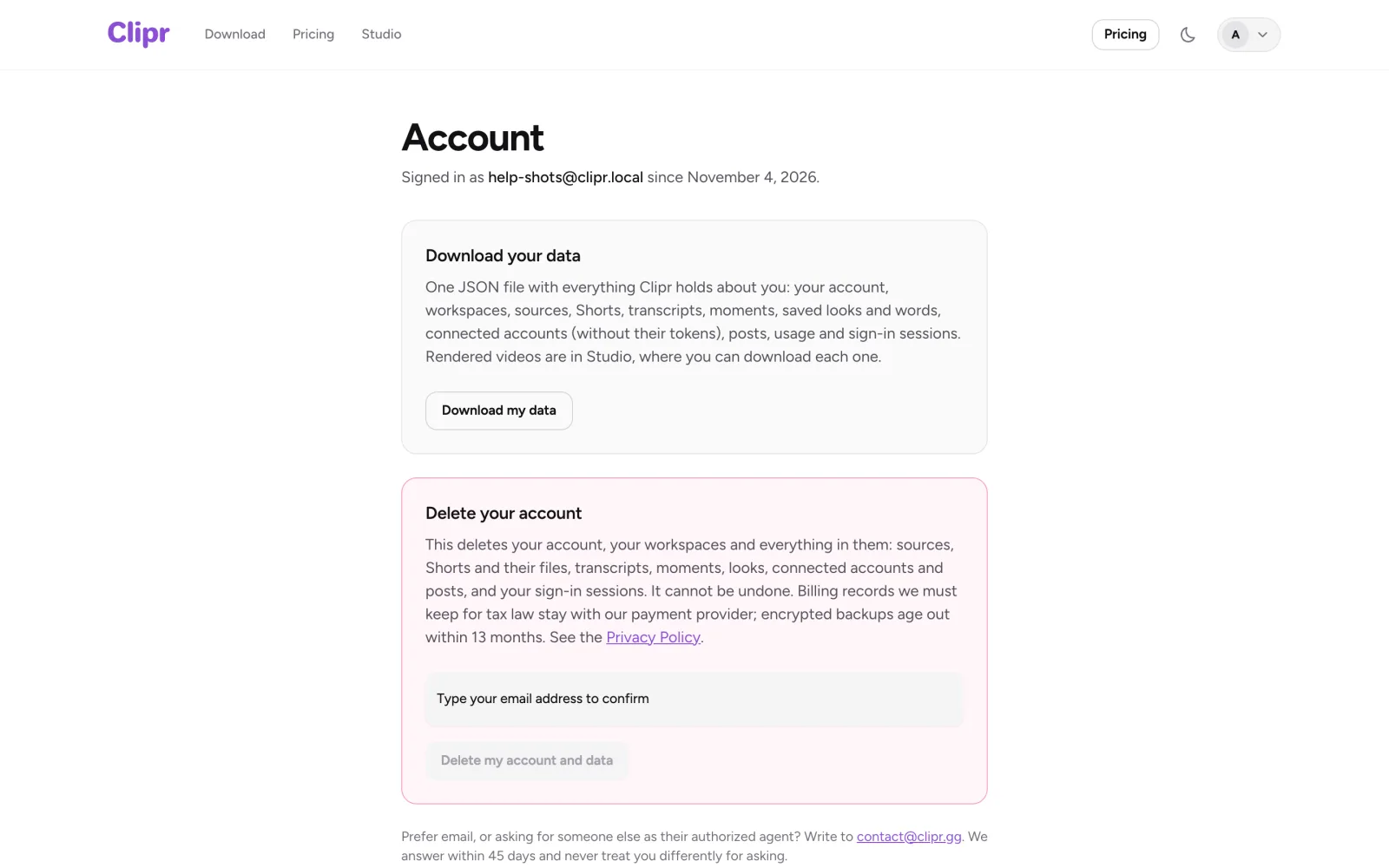
Step by step
- If you're on Starter or Creator, cancel your subscription in Billing.
- If you want to keep anything, download a copy of your data and save your Shorts from Studio.
- Open your Account page, type your email to confirm, and press Delete my account and data.
What gets deleted
Your account, sources, Shorts and their files, transcripts, moments, looks, connected accounts, posts and sessions. This can't be undone.
Billing records stay with the payment provider, as tax law requires. Backups age out within 13 months.
More questions
Why can't I delete my account yet?
If you see "Cancel your subscription first (Billing), then delete the account.", cancel your plan in Billing. A cancelled plan stays active until the end of the period you paid for, so deletion may stay blocked until then. If you need it deleted sooner, email [email protected].
Why is deletion waiting?
Deletion waits while a caption or render is still running, or while a post is publishing. Try again once it finishes.
Updated November 4, 2026. Still stuck? Ask on Discord or email [email protected].