
How do I change the caption font, color and position?
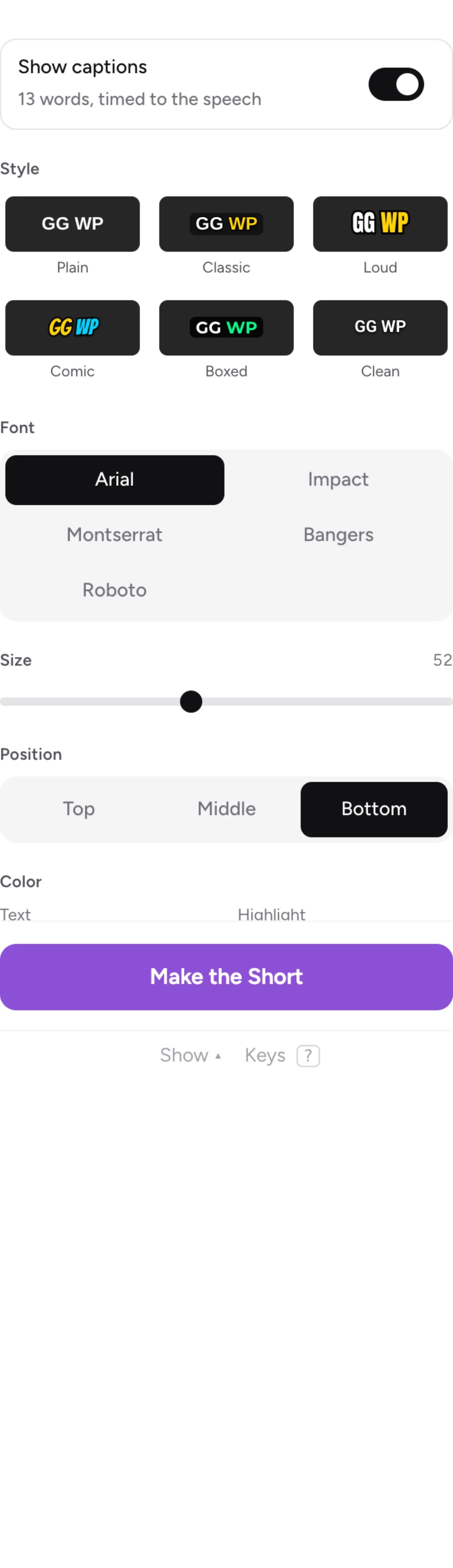
Open the Captions tab in Clipr's Short editor and pick a style preset, then change Font, Size, Position and Color. Free captions use Arial at the bottom; fonts, positions, colors and effects come with Starter and Creator.
The controls
- Style presets: Plain, Classic, Loud, Comic, Boxed, Clean.
- Font: Arial, Impact, Montserrat, Bangers or Roboto.
- Size.
- Position: Top, Middle or Bottom, or drag the captions on the preview.
- Color: Text and Highlight.
- Letters: ALL CAPS or As said.
- Words per line: 1 to 5.
- Animation: None, Pop or Rise.
- Effects: Word highlight, Drop shadow, Outline, Background.
Free and paid
Free captions use Arial at the bottom, with no colors, effects, animation or word highlight. Starter and Creator get all 5 fonts, Top, Middle and Bottom, colors, effects and word highlight. See plans compared.
On Free you can try the paid options in the preview. A bar then says "This Short uses N Starter features". Select Make it free, without it (or without them) to export on Free.
Can I keep the same caption style for a channel?
Yes. Save the channel's look and new Shorts from it start with your caption style. See saving a look.
Updated November 4, 2026. Still stuck? Ask on Discord or email [email protected].