
How does Find moments work?
Find moments is Clipr's AI that reads a whole Twitch or Kick stream (its chat, viewer clips and what was said) and picks up to 30 drafts, each 10 to 90 seconds long, that you can render as Shorts. Paste a VOD link into Studio, press Open, then press Find moments on the stream's page.
Step by step
- In Studio, paste a Twitch or Kick VOD (past broadcast) link into Paste a clip or VOD link and press Open.
- On the stream's page, press Find moments.
- Wait while it works. It usually takes 5 to 15 minutes, so you can close the tab.
- Open the drafts, then press Render on the ones you want as Shorts.

What it reads
Find moments looks at chat, viewer clips and what was said. Viewer clips with 5 or more views show up early as drafts, before the rest is done.
A stream with almost no chat is judged by how it sounds and what was said. You will see "Picked from how the stream sounds and what was said: it has no chat or viewer clips to read". For a video you uploaded, it reads what was said and how loud it got.
Find moments works on streams, not clips.
While it runs
The progress goes through Waiting for a worker, Reading chat and viewer clips, Listening to the best parts and Picking the moments. A box to email you when it's ready is ticked by default. You can leave the page; Activity shows how it is going.
The drafts
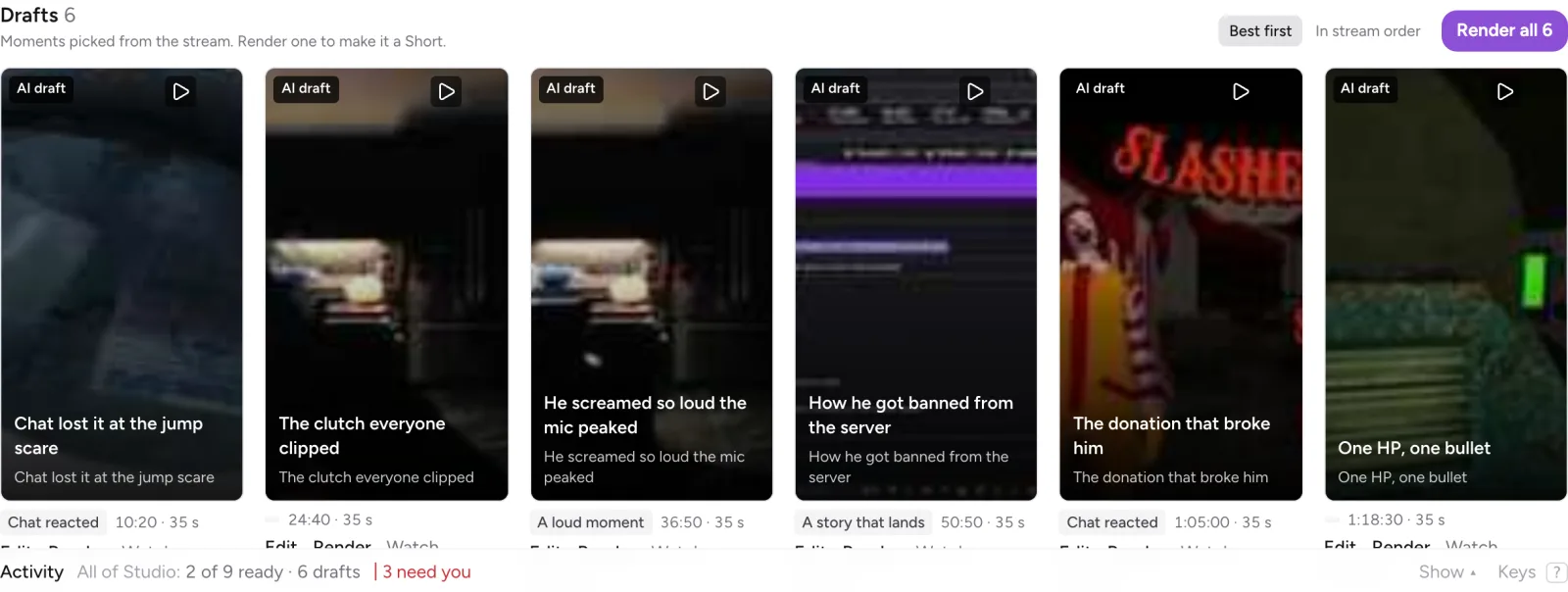
You get up to 30 drafts, each labelled with why it was picked: Chat reacted, Clipped by viewers, A loud moment or A story that lands. Each draft has Edit, Render, Watch and Dismiss.
You can sort by Best first or In stream order, and render many at once with Render all N or Render N picked. Afterwards the button reads Found N moments.
How many runs you get
- Free and Starter: one free stream per account.
- Creator: 10 streams a month.
A run counts only when it finishes. A failed run never counts, and a finished run that finds no moments is given back, including your free stream. See Free vs paid and compare plans.
More questions
Can I render the drafts on Free?
Yes, up to 3 drafts, ever. The button reads Render N, free, or All N with Starter to render the rest. Trimming a draft in the editor needs a paid plan.
What if my stream is longer than 10 hours?
Each run reads up to 10 hours. On Starter and Creator you pick which 10 hours to read. See streams longer than 10 hours.
What if it found nothing?
The run is not counted. See why Find moments found nothing.
Updated November 4, 2026. Still stuck? Ask on Discord or email [email protected].