
How do I post a Short to YouTube, TikTok or Instagram?
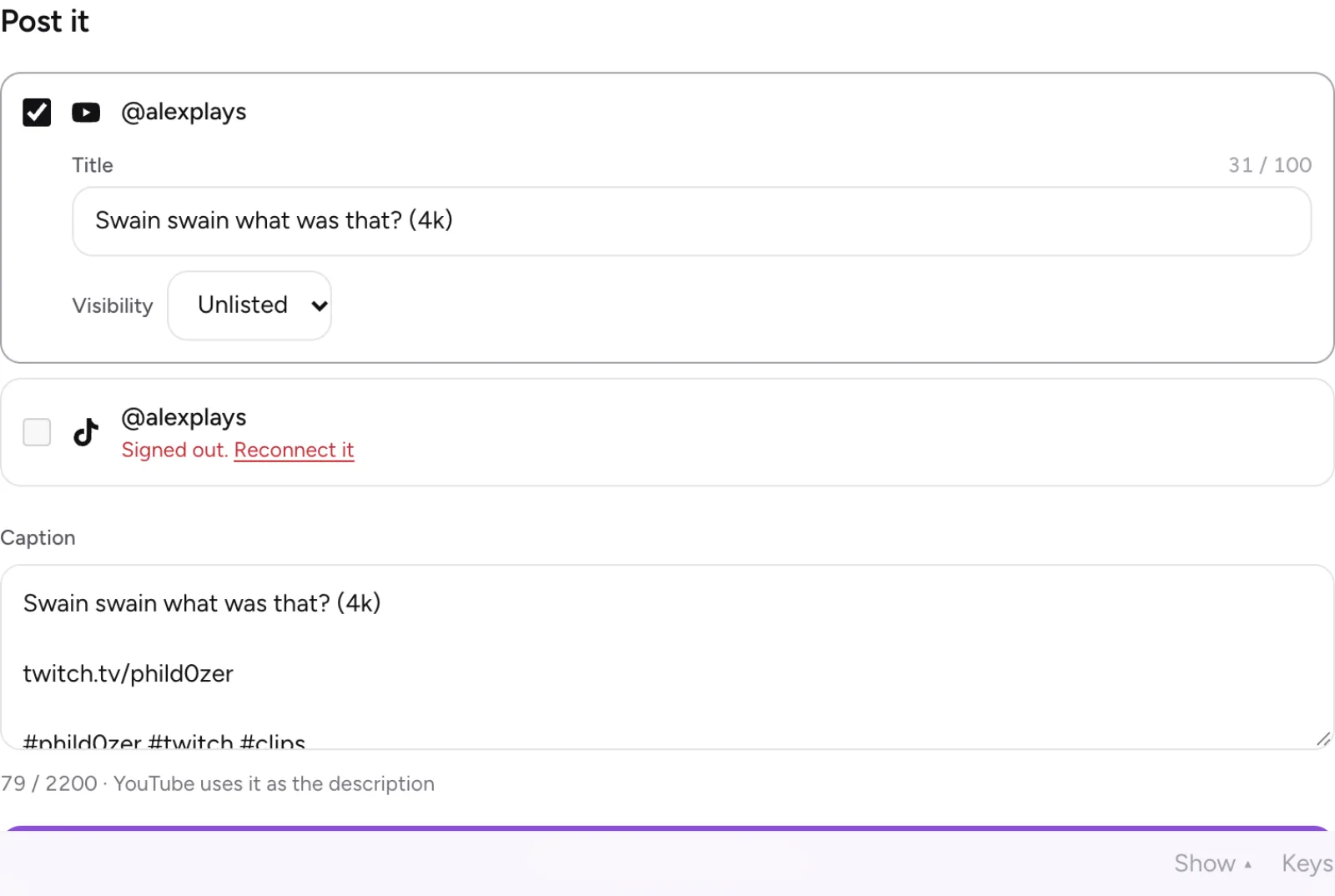
In Clipr, open a finished Short's page and use the Post it panel. Pick your connected accounts (up to 6 at once), write one caption, set each platform's options and post. A Short exported in your browser must be saved to your library first, and posting needs Starter or Creator.
Step by step
- Connect your accounts in Studio under Accounts: YouTube, TikTok or Instagram.
- Finish your Short. If it was exported in your browser, save it to your library. See making a Short.
- Open the Short's page and find the Post it panel.
- Pick the accounts to post to, up to 6.
- Write your caption and fill in each platform's options.
- Post, then follow its progress on the Posts tab.
Save it first
Posting sends the Short from your library. Shorts rendered on Clipr's servers are already there. If a browser export isn't saved yet, Clipr says "Save the Short to your library first: posting sends it from there."
The caption
There is one caption for every account, up to 2200 characters. YouTube uses it as the video's description.
YouTube options
- Title: up to 100 characters. If you leave it empty, the title is "Short".
- Visibility: Public, Unlisted or Private. Unlisted is the default.
- Clipr adds #Shorts to the description if it's missing, sets the category to Gaming and notifies your subscribers.
- A vertical video under 3 minutes counts as a Short on YouTube.
TikTok options
- Privacy: the choices come from your TikTok settings (Everyone, Friends, Followers, Only me). Nothing is preselected, so you pick one.
- Comments, Duet and Stitch are off unless you turn them on.
- Disclose video content adds "Promotional content" or "Paid partnership". Branded content can't be private.
- The Short can't be longer than TikTok allows for your account. If it is, Clipr tells you the limit and asks you to trim it in the editor.
- Posting agrees to TikTok's Music Usage Confirmation.
- A post can take a few minutes to appear on your profile.
Your Short goes up as a public Reel, shared to your feed. There are no options to set.
Post statuses
The Posts tab shows each post as Uploading, Processing on the platform, Posted, Failed or Cancelled.
Processing means the platform has the video and is still working on it. Clipr checks every minute and stops waiting after 2 hours. YouTube posts go straight to Posted.
More questions
Where did my TikTok post go?
If you didn't allow direct posting when you connected TikTok, it's in your TikTok inbox as a draft. Publish it from the TikTok app.
What if a post fails?
Clipr retries it automatically and emails you if it still fails. See why a post failed.
Can I post a Short I downloaded?
Posting works from a finished Short saved in your Clipr library. You can also download your Short and upload it yourself.
Updated November 4, 2026. Still stuck? Ask on Discord or email [email protected].